Hi all, does anyone experience a problem like tis in BBMO 2.0:
Since converted the 1> 2 I get an error in writing the project on SD-card. When I format the SD-card it works fine. But when I change for example a playlist in BBMO 2 and want to sync to SD-card again, I recieve the message: (Only after fotmatting again it works but the next sync gives the message again)
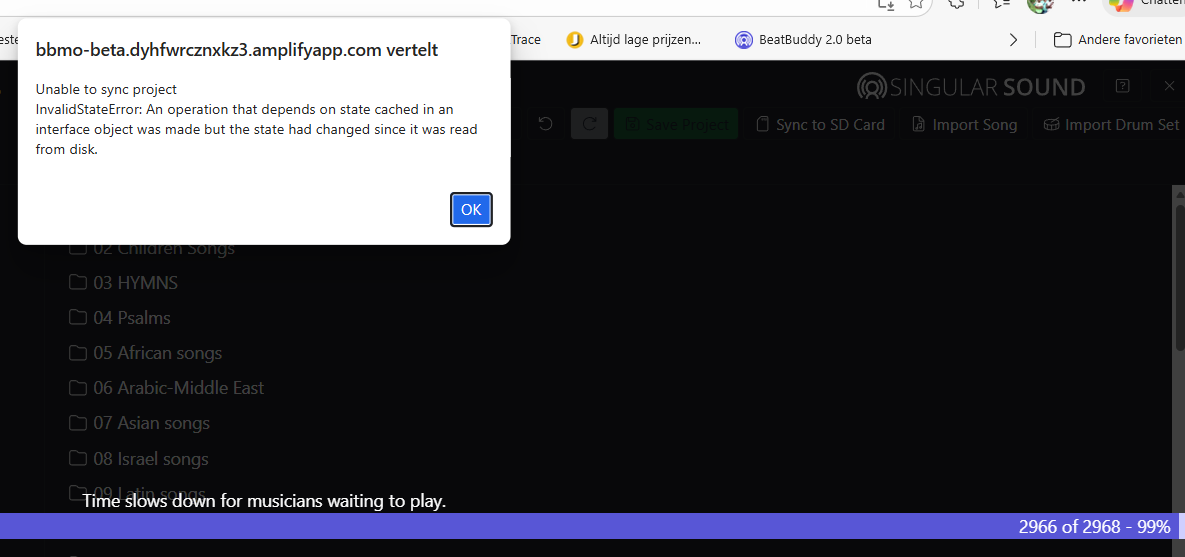
I am unable to reproduce your symptoms. For example, I converted a BB1 project to BB2 using the BBMO and successfully synchronized the project to my SD card. I then make changes to my Playlists on the BBMO, save the project and successfully synchronize it with the SD card. I am using an external USB media reader.
Based on the description of your symptoms, it seems that the problem may be based on the type of SD card, or the integrity of the data and transfer connection between your computer and the SD card.
What type of SD card are you using? You might want to try a different SD card if you have one. It should be an SDHC class 10, 4-32Gb card.
What format are you using for the SD card? It should be MS DOS(FAT-32) and there should not be a need to reformat every time. Of more interest though, why did you start formatting the SD card? Was it based on the error message?
If the BBMO successfully saves the project on your computer, the symptoms and message seem to indicate a problem with your computer slot reader, external media reader, defective USB cable or a bad SD card. You might want to try a different SD card if you have one. SDHC class 10, 4-32Gb.
UPDATE: I just noticed that on the initial attempt when pressing the Sync to SD Card button in the BBMO that the window that opens displays the project folder on the computer. If you proceed with the synchronization based on that initial display window, it will fail. Make sure that you switch to and select the SD card using the Windows Explorer. If this was the case, it may explain what you are experiencing. On subsequent synchronizations when I make a change to a Playlist or any song in the Songs Folders, it will display the window for the SD card and I can proceed with the process. If this is what you are experiencing, it would seem that the developers could improve the process by having the BBMO prompt for a selection of the SD card instead of showing the contents of the project folder on the computer.
Once you have synchronized your project to your SD card, are you able to play the songs in the BB2 and are the changes to your Playlist reflected?
If you need further help, please reach out to Support, support@singularsound.com. Once it’s sorted out, let us know what was needed to resolve the problem. Support might ask you for a video showing the steps you take in the BBMO leading up to and including the error message.
Since this topic is different than the original thread, I’m moving your post to a new thread.
What is the size of your SD card and what is the size of the project? It sounds like you might be on the capacity limits of the SD card.
Thanks for reply:
I am using the Sandisk Extreme Pro SDHC 95MB/s V30 UHS-I U3 32GB and indeed MS DOS(FAT-32).
The reason that I formatted the card again is than the sync to SD-card gave this error. After formatting, thye sync to SD-card worked, but much slower of course to write the whole project again. But then afther using the card (with no problem) in BB2 I did only changed the playlist in BBMO 2 (Saved on computer succesfully) it gave the same error again. So I did the same procedure: Format the SD, sync to card again and it worked for that moment.
I have done one thing after converting the project from 1 till 2: I changed the name of the project from: ‘Complete Collection 2025.1 by GoranGrooves.bbp’ to ‘Complete Collection 2025.1 BB2.bbp’ for shorter recognising name as project for BB2 (I also still have the BB1 version). But again, after changing than name I synced the whole project on the fresh formatted empty sd card.
My project is about 4-5 GB so it should be fit on the card.
Maybe take the card in and out did damaged the card so I ordered new ones and will try that.
One quick extra question: In BBMO still appears the full name: BBMO - Complete Collection 2025.1 by GoranGrooves. Should that change when I change the name of the project or how to do that? Maybe there could be an issue?
Thanks anyway!
Thanks for the details. Did you read the UPDATE: paragraph in my reply and could that have had an impact on what you are reporting?
Changing the project name in the BBMO does not change the name of the project file in your computer folder or on your SD card. However, that should not be the cause of your issue.
What I would recommend is to shorten the name of the BBMO project name and the file name. Eliminate the period e.g., .”2025.1 by Goran”. Consider a simple name like BB2 PLC-GG
Rename the project in the BBMO and save project
Quit the BBMO
Rename the project file on your computer to be the same as your BBMO project name
Launch the BBMO
Sync your project to your SD card
You can rename your SD card to match your project name or any other name you choose. I have cards named for BB1 and another for BB2.
Thanks, sorry for late response but I forgot there is a very simple solution to change that name of Goran groove at the left top shown in BBMO:
Just open the *.bbp file with notebook (Windows). In the line you see, it says in brackets (<…>): Project Info Name="Complete Collection 2025.1 by Goran”. Just change the name between “….” and leave the rest untouched, save it and done. My project does now shows the name “BB1 - Goran 2025.1” also in the left top of the screen of BBMO
Second: I found a problem with a specific multi-power supply where the BB2 wouldn’t start up because it was too slow to start up, despite supplying 500 mA/9 V.
The Strymon Ojai has the same problem: it’s a good power supply, but not for the BB2.
I switched to the Rockboard ISO Power Block V6+, and the BB2 always starts up fine. I hope this helps others.
Thanks for your support!
1 Like
No need to go that far. You can just rename the .bbp file. For example in the Mac, I just click on the file and it highlights the title (but not the extension) and I can rename it. I recommend not using a period within the name as it might confuse the extension name. Instead, I’d name BB1 - Goran 2025.1 as BB1 - Goran 2025-1