I do tap it and it makes the song list go up or doen and not select the song
@DanielSingularSound should be able to help you out here, are you using the BeatBuddy 1 or the BeatBuddy 2?
Bearbuddy 2
Hi Phil,
For the BeatBuddy:
You must send 2 separate commands: LSB (as CC-32) and Program.
LSB is sent as a CC command, as CC-32. The value you put in after that is the value. So if you put CC-32 value 1, that would be LSB 1.
Program is program. Select program change as the command type, and then put in the appropriate value.
For the BeatBuddy:
LSB: The folder number minus 1. (because it starts from 0)
Program: The song number in the list minus 1.
Song Select detailed explanation: link
If the issue persists, please feel free to contact us at support@singularsound.com. Please let us know if you are using a MIDI Maestro or a different device. If possible, please also send us a short recording or screenshot of the settings you are using, and we’ll be happy to assist you further. Thank you!
Wow I wish I know what you were talking about.. this seems that it should be much easier with the beatbuddy 2 and midi maestro.. ( both expensive) and I’ve been around computers and music electronics for many years including a ton of different dr machines.. should be simple
If you can let us know what equipment and program you are using, I’m happy to help with the setup accordingly.
It may sound complicated at first, but it is quite simple once you are doing it!
You do not need a BeatBuddy 2 for this. The same thing works with the BeatBuddy 1 as well, although you mentioned in your previous post that you are using a BeatBuddy 2.
Please let me know what app or MIDI device you are using and how your MIDI is currently set up, and I can provide the instructions accordingly.
What is your physical MIDI setup? Which device’s OUT is connected to which device’s IN?
Let’s say you have Device A’s OUT connected to Device B’s IN, and Device B’s OUT connected to Device C’s IN, you would write it like this: Device A (OUT) > (IN) Device B (OUT) > (IN) Device C.
That’s important information.
I’m using a new Beatbuddy 2 and the Midi Maestro. I downloaded a bunch of songs from a collection I found on your site, Many different folders with songs. All I want to be able to do is select different songs from different folders and play them using the Midi Maestro. What I think you’re saying is…I can select folders on the midi maestro , but to actually select songs I will need to select them using the beat buddy 2 switch yes? So did I really need to buy the midi maestro? or should I have just bought the add-on switch pedal?
Thank you so much and sorry for being a pain.
Phil
PS.. once I get this straightened out I will do a video on my issue and how it was resolved. BTW I am also a popular audio mixer company Beta Tester
This may or not help you wrap your head around your questions and it’s just a temporary placeholder until Support can respond with greater detail.
The answer to your questions are “no” for the BeatBuddy 2 switch and “yes”, the MIDI Maestro (MM) is the tool you need. However, there’s a missing ingredient that will make your life easier: the BeatBuddy Manager (BBM) Online (BBMO). It identifies the values for each folder and song you need to program the MM. Take a look at p103 in the BeatBuddy 2 Manual to get an idea of what I’m talking about.
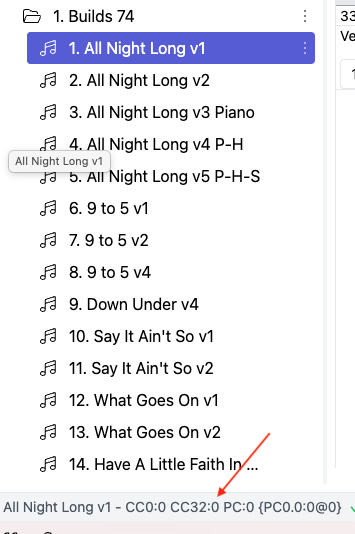
Here’s a screen shot of the folder and song values that you will program in the MIDI Maestro Custom Mode
Here’s a screen shot of the table on p103 to show you what to program for different songs located in different folders
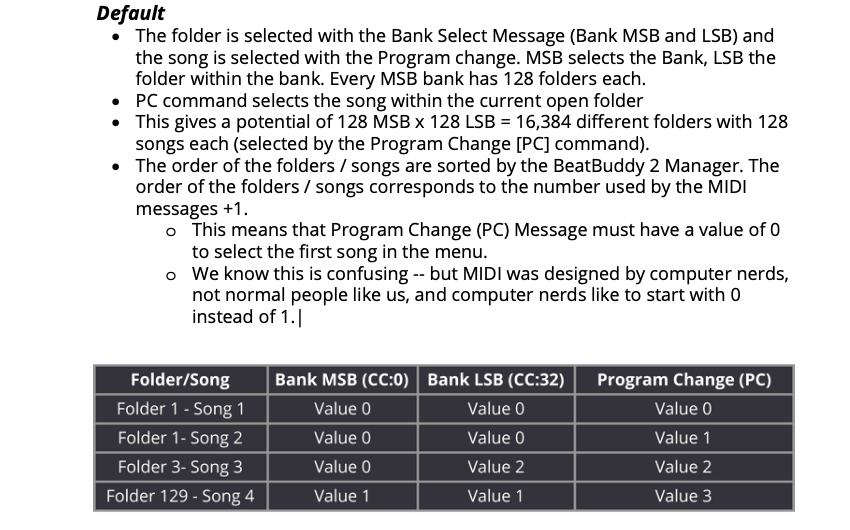
Keep in mind that these values do not travel with a song so if and when you move a song from one folder to another (or within a folder) you will have to use those new folder and song position values.
Although I’m going to suggest that you invest the time to learn how to program the MM (after all, that’s one of the reasons that you bought the MM), there are a couple of other options to consider:
Option 1: learn how to build a Playlist using either the BBMO and the BB2
Option 2: duplicate songs (or you can just drag them instead) from one folder and move them to a new folder; you can then move them around in the order you want.