In the BBMO, please bring back the ability to move/copy/delete entire rows of notes. Why would you ever get rid of that?
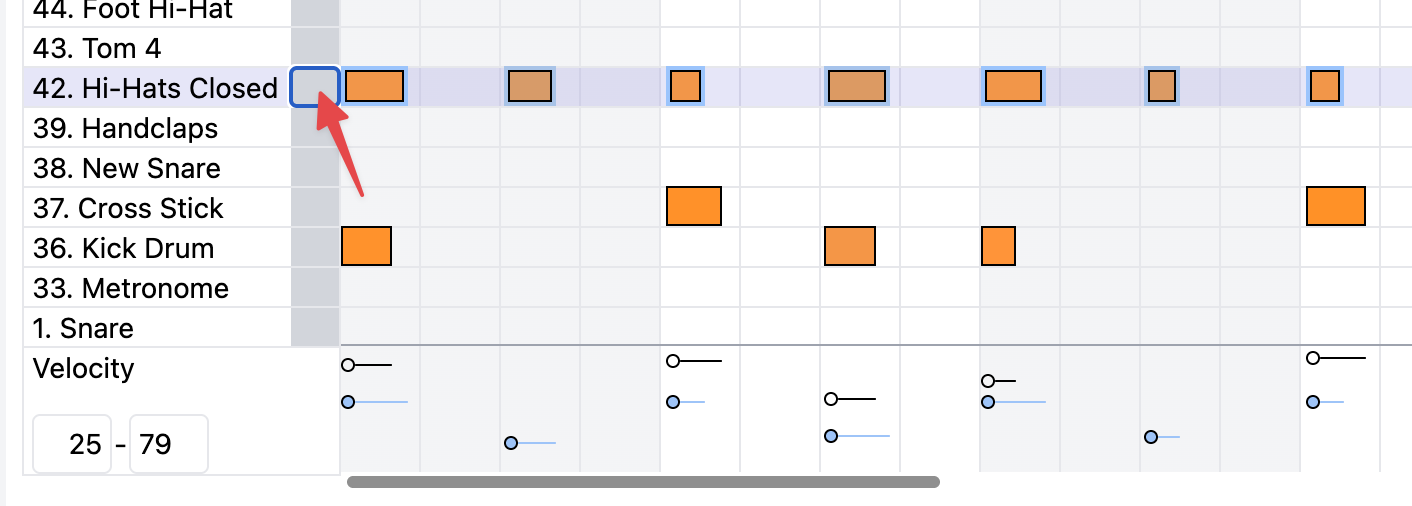
Click on the grey box next to the instrument name to highlight all the notes in that row and press delete to remove (or up down arrows to move; or ⌘+C to copy) all the notes for that instrument (row)
1 Like
Deleting works. Copying/pasting sadly does not. At least, not by starting by clicking the grey box.
The grey box is for copying the entire track. If you highlight notes, you need to use the keyboard (Ctrl+C or ⌘+C) to copy and (Ctrl+V or ⌘+V) to paste

1 Like
Ah!! Okay, so moving the row with the up/down arrows works pretty nicely! Okay then, moving on…
1 Like
Grey box?? I have no grey box, if i right click on a midi note in the editor i just get right click window options, the delete track button deletes the entire track, this is doing my head in, I used the the old BBM for ever with no issues the online one is buggy as hell. At this point my only option is to creat new tracks for the tiniest changes, if i try to lower the velocity of instruments to 0 to just get them out of the way the last midi note still plays ( even when set to 0 )
BBMO doesn’t support right clicking at all. Everything is a normal click.
If you want to delete a note, click on the note and then use your keyboard delete button to delete the selected note.
This is the grey box I was referring to that selects all the notes for an instrument
Thanks for that, I am running windows 11 for anyone else reading this and having the same issue -at first glance there is literally nothing in that spot so to me, it is very non intuitive. The grey box thing is good for deleting a whole line of midi notes, but it is SHIFT-DELETE, pressing delete by itself does nothing ( which was my issue) but to delete single notes just highlight the note, press “SHIFT-DELETE” - delete by itself doesnt work on W11. Thanks for your help Andrew, appreciated.