Display song numbers in BeatBuddy (BB) 1

When organising songs in folders using the BeatBuddy Manager software on a computer, each song is assigned a sequential number within its folder. However, these numbers do not appear on the BeatBuddy pedal’s LCD screen during use.

It would be extremely helpful for live performance if the BeatBuddy could display those song numbers on the pedal’s screen, either as:

an optional setting in the pedal menu, or

a toggle within the BeatBuddy Manager software.

Displaying numbers on the pedal would make it much easier to quickly locate and select songs during a performance, especially in large setlists. I use SONGBOOK and I can see the position/number of each song. If I want to jump from song 14 to song 25 I have to find it by name on the BeatBuddy pedal as I scroll through them. Having the number visible in the BeatBuddy screen would make life easier.

If possible, please consider this for a future firmware update.

Im sure that it would be greatly appreciated by many users.
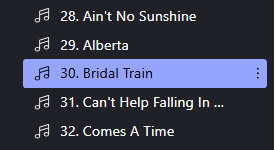
You already have that ability by prefixing numbers to the song titles in either the BeatBuddy Manager (BBM) or the BBMO. The nice thing about the BBMO is that you can also sort the songs unlike the BBM where you have to manually move each song. Just number them 01, 02, 03 and etc. An example might be 01 Proud Mary - CCR or 12 And I Love Her - The Beatles. This works in either the BeatBuddy 1 or the BeatBuddy 2.

Thank you for posting this feature request! I’ve forwarded it to the team for consideration.

That means that when you reorder the songs in that group the song numbers will not run in numerical sequence. Not the solution that I’m looking for. I use SONGBOOK for my Chord Lyrics. If I rearrange the songs they are automatically renumbered, that’s the feature that I’m requesting. When I use the BeatBuddy program on my laptop, the songs are numbered. That’s the feature that I am looking for. Thanks for your response, very much appreciated.

Hi Eddie, I use SongBook and the BB. I actually use MIDI from SongBook to my BB to tell it which song on the BB that I want!

In SongBook, I issue this for the song Bridal Train by The Waifs, note my BB is listening on Channel 3, that’s the “@3” at the end of each statement:
{midi: CC0.0@3 CC32.26@3 PC29@3 CC106.0@3 CC107.108@3 CC108.100@3 CC116.1@3}

CC0.0 - (combined with CC32, these identify the Folder)
CC32.26 - Folder 27 … remember that MIDI is zero based
PC29 - Song 30 in the folder … remember that MIDI is zero based.
CC106.0 - (combined with CC107 to set the tempo)
CC107.108 - Tempo of 108 BPM
CC108.100 - Sets the Volume to 100%
CC116.1 - Selects a specific drum set/kit - Brushes

Works a charm for me and never need to worry about Song Names and numbers any more. I just select the song in SongBook and my BB is already to go.

Thanks for that amazing information. Unfortunately I’m not as technical as you are so I have no idea how to connect my BeatBuddy Pedal to my Samsung Galaxy tablet where I have my Songbook songsheets?

I’m quite computer literate but no real experience of using Midi to do what you are achieving.

I don’t want to start renaming songs in BeatBuddy by adding numbers to the song titles.
In BeatBuddy Manager that I use to create the song drumbeat on my laptop, the program automatically assigns a number to the song. All I’m asking is for the developers to add a little bit of script to make that happen and be displayed on the BeatBuddy Pedal screen. I’d be very interested to know how you get your BeatBuddy Pedal to communicate with your Songbook device.

I forgot to mention that I use my BeatBuddy pedal in live performances and not in a studio environment and we play live except for the BeatBuddy pedal.

Thanks again for messaging me. It’s very much appreciated.

Thank you for your reply. It’s very much appreciated.

Hi again Eddie,

The Android version of SongBook is MIDI enabled and you will have Bluetooth on your Android. I use a CME H4MIDI WC device on my pedalboard. The H4MIDI WC might be overkill for your setup, but then again, you might be able to “automate” other devices that have MIDI capability.

Here is an overview of my rig:
Tablet with SongBook - mine is a Windows Surface Pro but the Android tablets work just as well,
CME H4MIDI WC - this is the hub for all my MIDI devices and has Bluetooth so the tablet can connect,
Neural DSP Quad Cortex - for all my effects,
BeatBuddy - for drums, bass, strings, keys,
Morningstar MC6 Pro - more MIDI switching functionality

When I select a song in Songbook, that sends 3 of those MIDI strings, one for the Quad Cortex, one for the BeatBuddy, and one for the MC6 Pro, telling all those devices what Song I am going to play next, what tempo, volume, kit for the BeatBuddy, what Preset, Scene for the QC, what bank and page for the MC6 Pro. From that point everything is waiting for me to press the start button on the MC6 Pro (or it could be the big start button on the BeatBuddy in your case), but the key is, my hands are now free to play my guitar and start singing.

When I press the start button (with my foot and my hands start playing the guitar), the MC6 Pro tells the BeatBuddy to start. When the BeatBuddy starts, it starts sending MIDI Clock signals which get all the modulation effects on the QC into the right tempo and sync, it also sends a START signal to my tablet and SongBook starts scrolling the song lyrics. Depending on the song in the BeatBuddy, I then use the footswitch/s to move to the different parts in the BeatBuddy song, or if I am using a OnePress song, I don’t need to touch the BeatBuddy any longer and can focus on the MC6 Pro or QC to change Scenes.

The MIDI has freed me up so much and I no longer have to tap dance on buttons as much, or have long count ins.

Cheers.