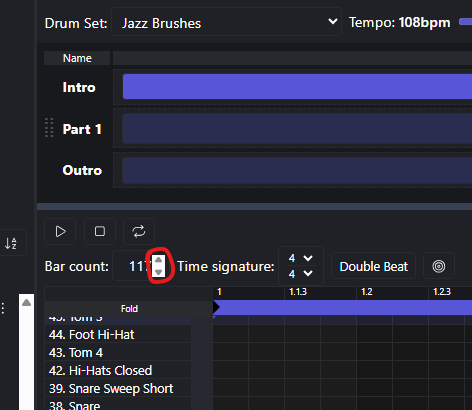
Hey all BeatBuddies !
I’m trying to extend the bar count in BBMO from 2 bars to 8.
I’ve already tried using Copy Track and Paste Track , but that only gives me six additional empty bars with no drum data.
This feels like it should be a fairly straightforward task, yet I haven’t managed to get it to work so far.
GrahamH
December 15, 2025, 11:12am
2
Hi Tobbe_Bergman,
Hover your mouse here in BBMO, and select the Up arrow 6 times (2 + 6 = 8).
You can get creative and use the [CTRL] or the [SHIFT] keys at the same time to add the bars at the start, or duplicate the last bar instead of creating a blank/empty bar.
persist
December 15, 2025, 12:30pm
3
You can also get more details from the BBMO User Manual 1.5.6
p14 depicts the Bar Count
Although the user manual documents most of the capabilities users will need, many features that should be included in next iteration of the user manual include Can you add a bar to the beginning of a MIDI file on the BBMO? - #4 by persist (courtesy of Andrew13 via GrahamH)
GrahamH
December 16, 2025, 7:15am
4
More than happy to give what I’ve learnt. The more that know, the easier it becomes. Pay it forward as they like to say.