I’ve tried things that I’ve found here, like deleting the file, replacing it with the downloaded version, but no luck. BBMO just errors on the delete and hangs on the replacement. I have to restart browser session. These songs sit in a folder with 93 songs controlled by Midi, so the song order is important to the midi commands (just saying). Also in playing around with this problem I’ve noticed that it appears that export of a folder, and then (re) importing is limited to 20 songs.
-
any suggestions? My next step is to create another folder, drag the good songs one by one, and retry the import of the bad ones, and delete the original folder.
-
is the reimport of a folder limited to 20 songs? (it could just be me at this point) I just want to know, so i don’t create folders with > 20 songs.
Thank you as always.
By your descriptions, it sounds like you have several songs that are now corrupt. The indicators are:
- song will not open or play in the BBMO or BBM
- songs cannot be deleted in the BBMO
- folders don’t display all of the songs when exported and then imported
If the songs on your BeatBuddy (BB) pedal can all be played, you can make a duplicate of the SD card (your project) using your computer OS. In the macOS, select the SD card and press CMD-D; it will create a folder with the same contents as your SD card and the same name with “copy” appended to the name. Although you can do this natively in the macOS, I don’t know if you can or how to do so as easily in Windows. Do this instead: create a new folder on your desktop, select and copy all of the contents of your SD card and then paste the contents into the new folder; name the folder. You can then try to open the duplicated project in the BBMO or BBM. Recommend using one or the other app but don’t try both. Why not? Because there’s reportedly a bug in the BBMO (or is it a feature?). Projects are probably no longer compatible between the two apps.
Try all of the songs in your duplicated project. If they open and play, you should be able to delete and replace the songs and export a folder with all of its songs.
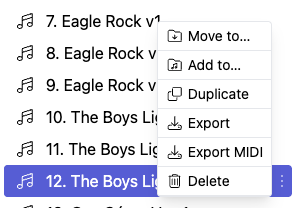
According to @andrew13, you can delete a song that can’t be opened or played by clicking on the 3 dots that are to the right of the song and selecting Delete. You should be able to place a new song in that same position to preserve your MIDI control codes.

I tried that but didn’t have any luck—I think the songs are corrupt.
If the songs are all good, your complete folder of 93 songs should be importable with all 93 songs. However, this is one of the indicators that some songs are corrupt.
Once you are able to delete the corrupt songs, you might have better luck by trying out the beta version v2.0.6 (2026-02-25) of the BBMO, located here https://bbmo-beta.dyhfwrcznxkz3.amplifyapp.com
I truly apreciate your swift and comprehensive response. I’ll let you know how I make out. I’m in the middle of doing a “reset” by starting fresh also (just in case). I’ll let you know how I make out. the import of an incomplete folder (song count) based on the fact that a song is corrupt certainly does make sense also.
Thank you for your time and I appreciate you and this forum SOOO much.
Bob