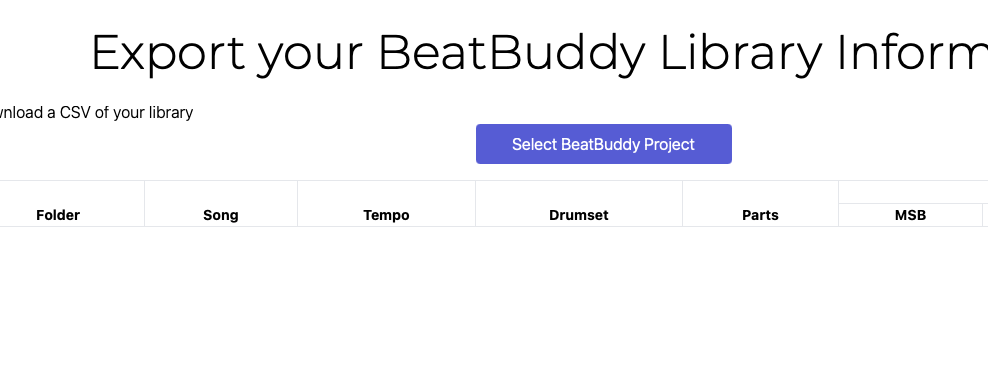
Is there an Excel or CSV of all BB songs with meta?

Is there an Excel or CSV of all BB songs with meta?

Including:

  • Folder LSB
  • Folder name
  • Song PC
  • Song name
  • Time signature
  • Tempo
  • Drumset
  • Number of parts

Any additional info is bonus :blush:

Currently I’m only interested in the default songs :relieved:

Edit: Or if not, can someone give tips on how to extract the data from the memory card? :upside_down_face: @andrew13? I do programming for work so no need to go to details :yum:

Your wish is my command :wink:

Time signature is a bit more complicated because the time signature doesn’t belong to the song but to each individual track. You can have multiple time signatures in each song.

I’d like to have them all :grin:

Did I understand correctly that the CSV export is not part of the paid BBFF app? :thinking:

Correct, it’s a free tool

1 Like

Very cool. Thanks for sharing.

I might suggest you consider renaming your button from Select BeatBuddy Project to Select BeatBuddy Project Folder. Some users may try to select the BB project file instead of the folder.

Thanks @persist I have updated the buttons based on your suggestion.
And to another user who let me know that the folder MSB was the same as the LSB in the export (this is now fixed)

Man, you’re super responsive!

1 Like

I’d like to make this as a solution, but without time signature it’s only a partial solution. For me the time signature is the most important meta data :thinking: (since tempo can be changed but time signature is fixed)

Would it be too much to add it as an option? I’m sure the BBFF users would like to be able to filter based on the time signature :yum: And the filtering capability is the end goal I’m trying to reach :relieved:

I want to be able to quickly pick a beat that matches any given song (with only one time signature). If the time signature doesn’t match then the beat is not usable. If the style/genre/intended tempo is not good I can still manage :smile: Best would be to be able to filter based on all possible meta data :blush:

Is this tool for exporting still working? I add my folder and it does not seem to do anything.

It should be. I just tested it with my project and it’s working fine.
Feel free to DM me if you want some help.

Thanks.

In the past, I used to do it (once or twice) without issues. Recently, I have tried with both Vivaldi and Arc, after selecting my Library folder, nothing happens. I will try later, maybe with Chrome, I don’t want to bother you much, but if I still can’t progress with this, will contact you. Thanks for your disposition to help.

I just tested with two different projects using Vivaldi, Dia and Chrome; one project worked nearly instantaneously with all three browsers; the other project folder, for whatever reason did not (display the prompt). I’m getting ready to check that project for a corrupt song…

It could be an indicator of something funky with your project or, you might want to check that the prompt isn’t behind your browser (drag the browser out of the way) to check if the prompt screen is behind it:

If it’s a funky (or corrupt project, you could try checking each song to see if it opens and plays in the BBMO. If you find one that does not open, delete it and continue checking the rest of the songs. Perhaps an easier way to narrow it down is to try and export each folder. If you find one that can’t be exported—you get the spinning wheel—it indicates that that folder might have a corrupt song. Having narrowed down your search, you can check the songs in that folder.

If your project folder is on iCloud or OneDrive, you might want to try again with the project on your local drive.

Thanks @persist. Just to be clear, I always get the prompt asking to upload, so that is not an issue. The tool seems to recognize my total number of songs just fine. I can post later, but I believe in my case the songs are way over 1,000 (I seem to remember 1,700, but I may be mistaken). And they are on my local drive.

Now, it could be something with my project. Right now, I can confirm that EVERY song in my project plays correctly in the BB, although some of them do not open in BBMO because of the recent “corruption” added in the latest BBMO, (that seems to be the adding of the autopilot info to the songs even though my project is a BB1, and the subsequently opening of the project in legacy BBM), as you well know from the other forum posts.

I will try again later, and keep you posted…

Yep… they are 1791 songs… and counting :grinning_face_with_smiling_eyes:

UPDATE:

1- I created a copy of my Library (drag and drop to another disk).

2- I went, one by one, (NOT FUN), through all my 1791 songs, and made a list of those that were not opening on BBMO. I confirmed that they worked PERFECTLY FINE, on the BeatBuddy pedal, and also, when I opened the copied library, on BBManager (legacy). The issue was only on BBMO.

3- I went on to re-construct the error files. Opened both BBM (with the copied library) and BBMO (with my production library). After unsuccessfully trying to import to BBMO a newly exported .sng file from BBM, I decided to manually export the midi files, the real content of the songs. SO, a) I created a new empty song on BBMO, b) manually wrote the tempo and drumset info, as it appeared on BBM, and c) imported the midi file into it. That is, I exported the midi file from BBM, and imported into the newly created empty song in BBMO.

30-ish reconstructed files later, it was time to try and use the csv tool from @andrew13 site. Eureka! It instantly processed my library and I was able to download the new csv file.

So, you cannot have reading errors on BBMO, or your library will not open on the Exporting tool.

The mystery remains, why does everything works just fine on BBM, and on the BeatBuddy pedal, but NOT on BBMO? What caused the corruption?

But on the happy side, the exporting tool works as flawlessly as ever, and now I have a clean library.

1 Like

I’m glad you got it working.

1 Like