I got a BeatBuddy 2 and imported my original project and converted to start using it. I’ve noticed a few beats acting funny. One specific example was captured in this YouTube video: https://youtu.be/elfsWY6YRno (and it won’t let me attach the midi file).
Essentially, in Pro Tools there are continuous 8th notes on the Clave. When I import to the original BBM, it plays it as it is from Pro Tools. However if I edit the beat in BBM, it shows up how it also imports to the BBMO (missing a lot of the notes)?!
I hope I understand your description of the issue. Not quite sure that what you’re reporting is a bug. I’ve watched the video and opened the MIDI file in the BBMO. A few observations:
I can’t tell from the video which kit you’re using in the BBM.
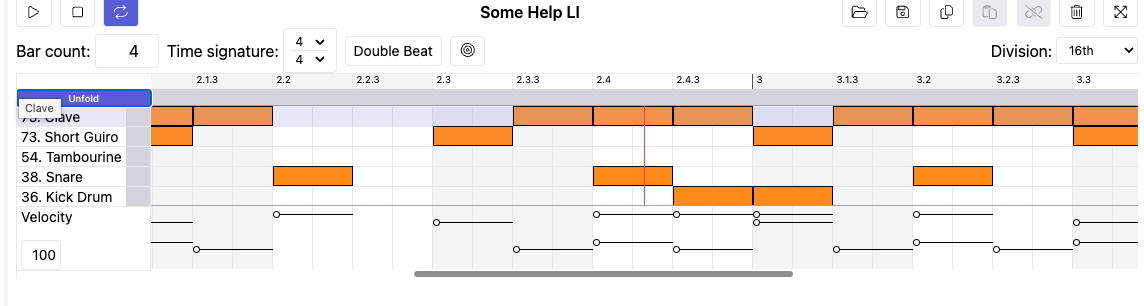
I used the SUB-Standard Pro Plain kit and it seems to to display and play the claves, guiro and other drum instruments back fine (see enclosed BBMO screen shot).
If you edited the file in the BBM and then exported it, the exported MIDI may have been corrupted and it might explain why you get unexpected results in the BBMO2 beta.
Export your MIDI from Pro Tools and then open and edit in the BBMO2 beta using a suitable kit (one that has all of the instruments.
Try increasing the velocity of the claves and tambourine so that they have a little more presence.
Funny how clear you think you are being until someone is trying to understand you .
I can’t tell from the video which kit you’re using in the BBM.
- The kit is the Standard Pro, with bass added and now converted to a BB2 HD kit in the BBMO2 beta (still just the original Standard Pro w/bass in the old BBM).
Export your MIDI from Pro Tools and then open and edit in the BBMO2 beta using a suitable kit (one that has all of the instruments).
- I did do this, same problem.
I started wondering though (and have since confirmed) – essentially there were some small overlaps of the 8th note clave in Pro Tools (and thus the exported file), and any that overlapped didn’t pull in to BBMO2 beta. I removed the overlaps in Pro Tools, re-exported and then imported to BBMO2 beta and the beat plays as intended (see attached screenshot). I guess the original BBM and BB1 played the beat fine with the overlaps – only if you went to edit the beat in BBM did it then exclude the overlapped notes like the BBMO2 beta is doing – so that was where I figured it was a bug.
If you go back to the YouTube video and listen to the beat played initially in BBM, verus played right after going into the edit, that’s what I was trying to show – you can hear the difference.
So essentially the problem is that the BBMO2 beta can’t handle overlapped notes on the same instrument (ie. Clave, or hi-hat etc.) Any such beats that worked in BBM will need to be edited to have a tiny space between notes for BBMO2 beta, and thus the BB2 to be able to play them correctly, unless that is something that can be fixed with an update?
Thanks for clarifying and sharing your solution. The screen shot was helpful (BTW, you should be able to upload .png files without zipping).
The BeatBuddy (BB) software has come a long ways since its introduction. In the beginning there were problems with proper handling of note offs which have been resolved with software updates (this was particularly evident with bass notes that when played, would sound “stuck” or of a longer duration than intended). Many of the early issues have been fixed. As users become more sophisticated and creative with their use of the system (software, firmware and hardware), new issues are uncovered.
As you build songs that include bass and other melodic instruments, you may find that you’ll either have to shorten or sometimes lengthen the notes to get them to play back or sound the way you want.
 .
.