Although Reaper is no longer my go to DAW (digital audio workstation), I remember all of the trouble I had trying to figure out how to get MIDI audio playback. Spent some time searching the user manual and the Reaper forum without much success. I got help from aashideacon and Phil (not Flood) and Phil suggested I click I click on FX within the MIDI instrument track (which for me turned out to be the clue that led to my finally being able to figure out the rest of the configuration).
I clicked on the FX button for the bass or drums track:

Another window opened, but the left pane was blank and that’s when the clue bit was set:
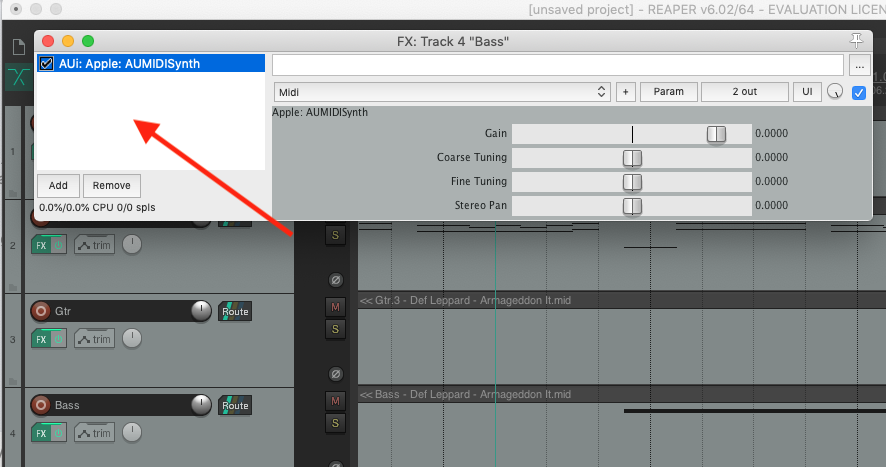
I clicked Add at the bottom left and it brought up another window:
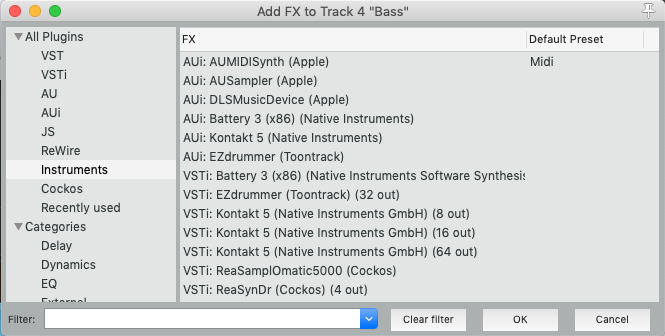
I tried all of the Apple AUIs and I finally settled on AUMIDISynth (Apple) because it seemed to work the best. I pressed OK and tried playing one of the MIDI tracks and I finally had audio.
I think you might have to select ASIO4ALL but since I’m not a Windows smart guy, I’m only guessing that this will at least put you in the ballpark.
This was several years ago and I’m sure I’ve probably forgotten a step or two. I think I had to do this for each of the MIDI instrument tracks to get audio from all of the MIDI tracks.
Oh yeah. If you’ve figured it out, how about posting back here to let other Windows users learn from you?