I have the New Beat Buddy 2 - - how do I access the “Crowd Buddy”?? - to be able to use it once I end the drum pattern or pause to end…
I found Crowd Buddy in the Drum sets….but what is next… Thank you
I have the New Beat Buddy 2 - - how do I access the “Crowd Buddy”?? - to be able to use it once I end the drum pattern or pause to end…
I found Crowd Buddy in the Drum sets….but what is next… Thank you
The instructions at Introducing CrowdBuddy! might be helpful.
Thanks - but I am not good with the BBM - - and the SD card that came with BB2 has “Crowd Buddy” as a drum set… hoping to keep it simple using the Singular Sound SD card somehow to access this feature….
I’m not sure that there is a simple method of using just the SD card to take advantage of the CrowdBuddy sounds.
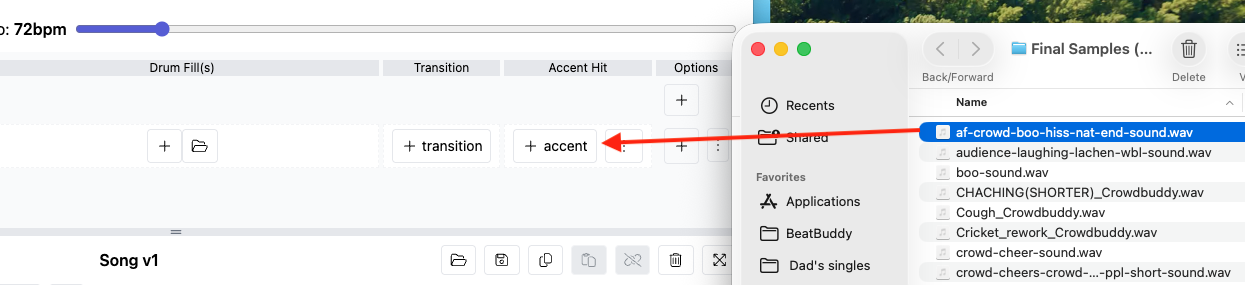
If you aren’t using the BBM Online (not the BeatBuddy Manager (BBM)), you might find it much easier to add CrowdBuddy sounds as an Accent Hit to one of your songs.
Here’s how simple it is using the BBMO:
On the BeatBuddy Manager (BBM) it’s almost, but not quite as easy:
Thank you. I will give it a try