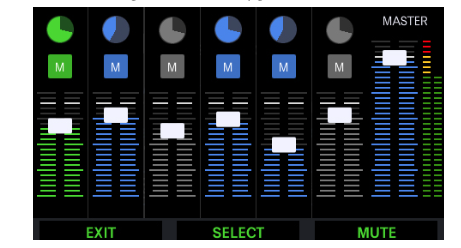
I have to admit I haven’t used the Aeros too much over the last two years, but I decided to come back.
If I remember correctly on my older firmware the track button always served as mute/unmute when it a double tap. In my case (5.4) I only have record/overdub on that button (both in 2/2 and in 6/6 mode).
Is there any hidden setting for this?
Mixer Screen 1:
You may find the Aeros User Manual to be helpful. Printer friendly version of the Aeros User Manual and p18 will get you started.
I mean the main looping window, not the mixer…
Did you come up empty searching the user manual? The link is in the blue colored text above.
I read the manual. I mentioned that the double tap feature to mute/unmute a track doesn’t work any longer in my looper window. It’s like this function is gone.
Don’t know what to tell you as all I could find on the forum was this post: Aeros - Mute Immediately vs. Mute + Unmute
Aeros may be expecting that you’ve configured the settings.
If you have a MIDI controller, you can use that instead.
If not, reach out to Support, support@singularsound.com for help. Would be interested in hearing what they have to tell you so please circle back and let us know.